Forty people, five days, and a spreadsheet holding it together.
That's the part that breaks. EventHost is for photographers running multi-day retreats, tours and conferences: the schedule, the session places, the people and the messages, in one app your attendees actually use. Not a booking form, and not a workshop tool stretched over five days.
Your attendees run the event from their pocket: EventHost is a free iPhone & iPad app.
The demo opens a sample event you can explore as the organiser: no sign-up, nothing to install. $299 for one event, or $349 a year for up to five. Attendees join free from an invite.
Why it exists
The bits that go wrong on a long event.
A one-day workshop you can hold in your head. Five days, forty people and a dozen sessions you cannot, and that is where events come apart.
The schedule moved and half the group didn't hear
Sunrise shoot pushed back an hour, and you're texting people one at a time. Change it once here and it changes in everyone's phone calendar, because they subscribed to it rather than screenshotting a PDF.
Twelve people want eight places
Limited-place sessions fill first-come with a waitlist that promotes itself when someone drops, or you allocate by hand. Either way nobody turns up to a session that was already full.
The group chat buried the thing that mattered
Announcements sit apart from the chatter, and you can switch on read receipts to see who has actually seen the 5am start before you drive off without them.
Nobody knows who's landed
Attendees add their flights and where they're staying. You get the whole event's arrivals in time order for airport runs, and they see who lands near them without seeing anyone's flight number or address.
You're printing name badges at midnight
ID cards print to CR80 badges or Avery inserts with a personal QR on each. Attendees scan themselves in on the day, so you're not standing at a door with a clipboard.
What it does
Daily schedule
Lay out keynotes, workshops and experiences across each day, with speakers, times and locations. Attendees read it a day at a time or all at once.
Capacity-based allocation
Limited-place sessions fill first-come with an automatic waitlist, or you allocate manually; attendees pick what they want.
In their own calendar
Attendees subscribe once and their sessions appear in iPhone or Google Calendar. It's a subscription, not an export, so a session you move during the event moves for them too.
Reminders before each session
A notification 15 minutes before the sunrise shoot, or an hour, or not at all: each attendee picks. Only for the sessions they're actually in, and moving a session moves the reminder with it.
Flights & accommodation
Collect arrivals, flight numbers and hotels, read the whole event's arrivals in time order for airport runs, or import the lot from a spreadsheet. Attendees see each other's times only.
Venue tickets
Hold the operator's QR codes for a session, one for the group or one each, and each attendee sees only the ticket that's theirs, right above the session details at the gate.
Chat & announcements
An event-wide channel, attendee groups and private one-to-one messages, plus notices that reach everyone instantly.
Shared photo gallery
Every attendee uploads their shots and tags them to a workshop, a living gallery for the whole event.
ID cards & self check-in
Print CR80 badges or Avery 5392 inserts with a personal QR; attendees scan to check themselves in, and tap once to check out when they head off.
Activity map
Pin each session's location, or drop a pin from its address, and attendees see them on a map they can filter by day.
Loan gear
Lend bodies and lenses with QR stickers and check-in/out, and let attendees flag the gear they'd like to try before the day.
Group orders
Photograph the menu board and everyone adds their coffee or lunch against their own name. The list totals itself, so you order three flat whites instead of reading out twelve names.
Read receipts
Optional, and organiser-only: see who has actually read the announcement before you set off without them. Off by default, and nothing is recorded while it is.
Sponsors
Show sponsor and partner logos on a dedicated page, a dashboard strip and the printable Event Guide.
Share & tag
Your hashtag and the accounts to tag, with the @handles ready to copy. One tap puts the tag and every account on the clipboard, so nobody misspells an account and tags nobody.
Three ways in
Invite people by email, share one join link, or hand out a short event code. Turn on approval and nobody sees a thing until you let them in.
Themed to match
Colours, logo and feature toggles per event; one app runs many events, each on-brand. A dashboard by default.
On the day
What it looks like in your hand.
Real screens from a demo event. Everything here is running the same app your attendees get.
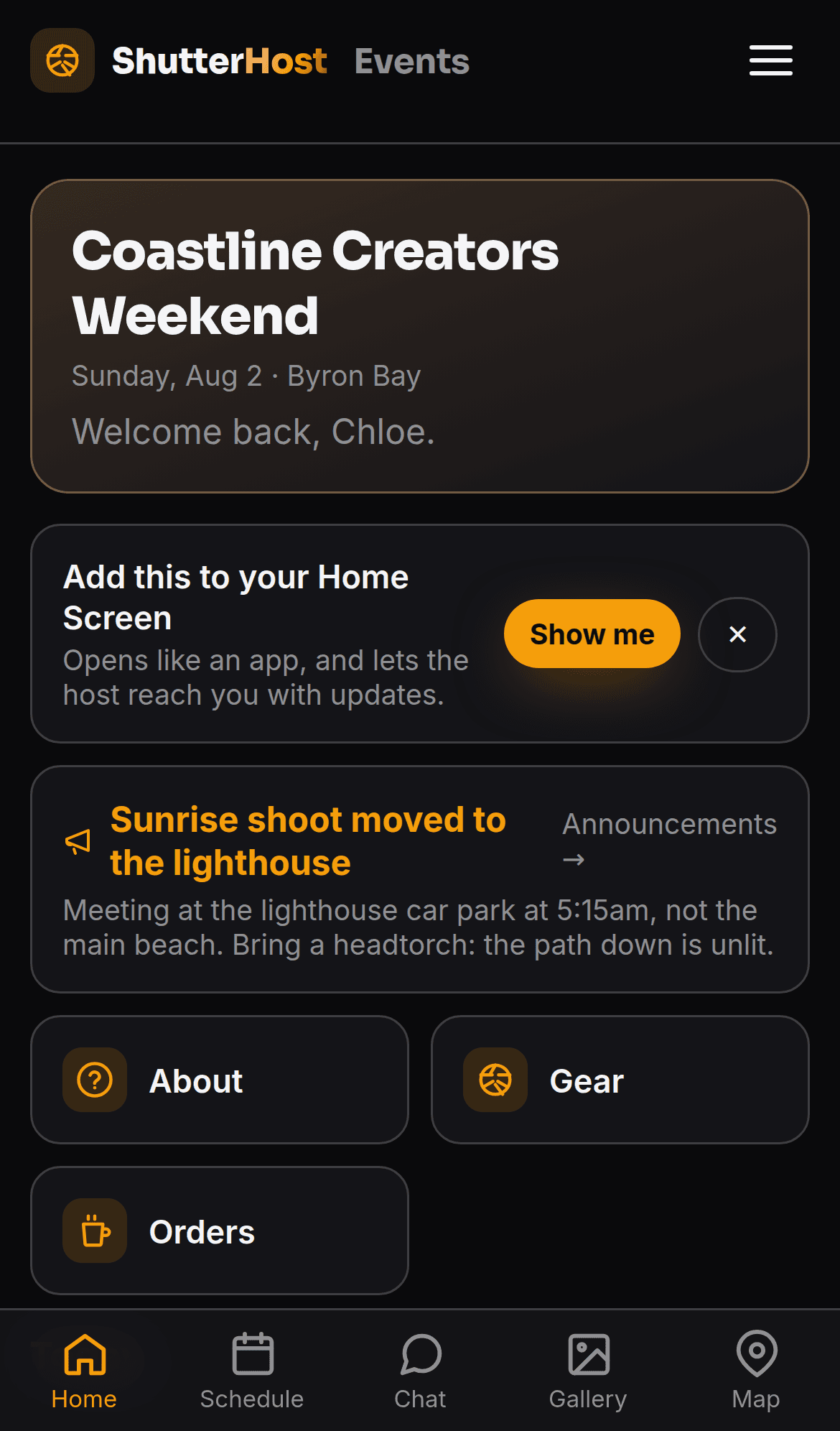
The attendee's home screen
What's happening now, the latest notice, and one tap to whatever this event actually uses. It installs to the Home Screen and sends notifications, and the app walks people through both.
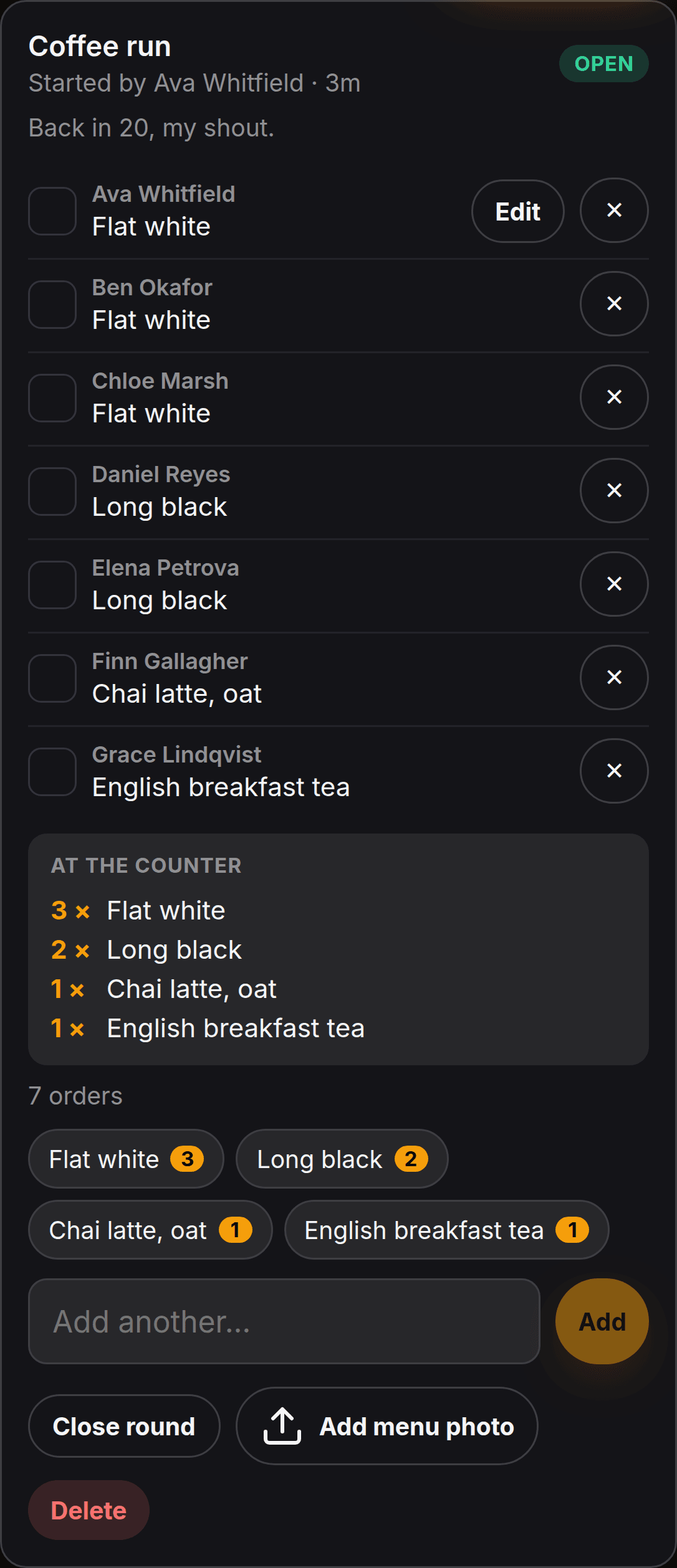
A coffee run that adds itself up
Everyone orders against their own name. Whatever somebody types becomes a one-tap button for the next person, so the counts stay exact and the summary is something you can read out at the till.
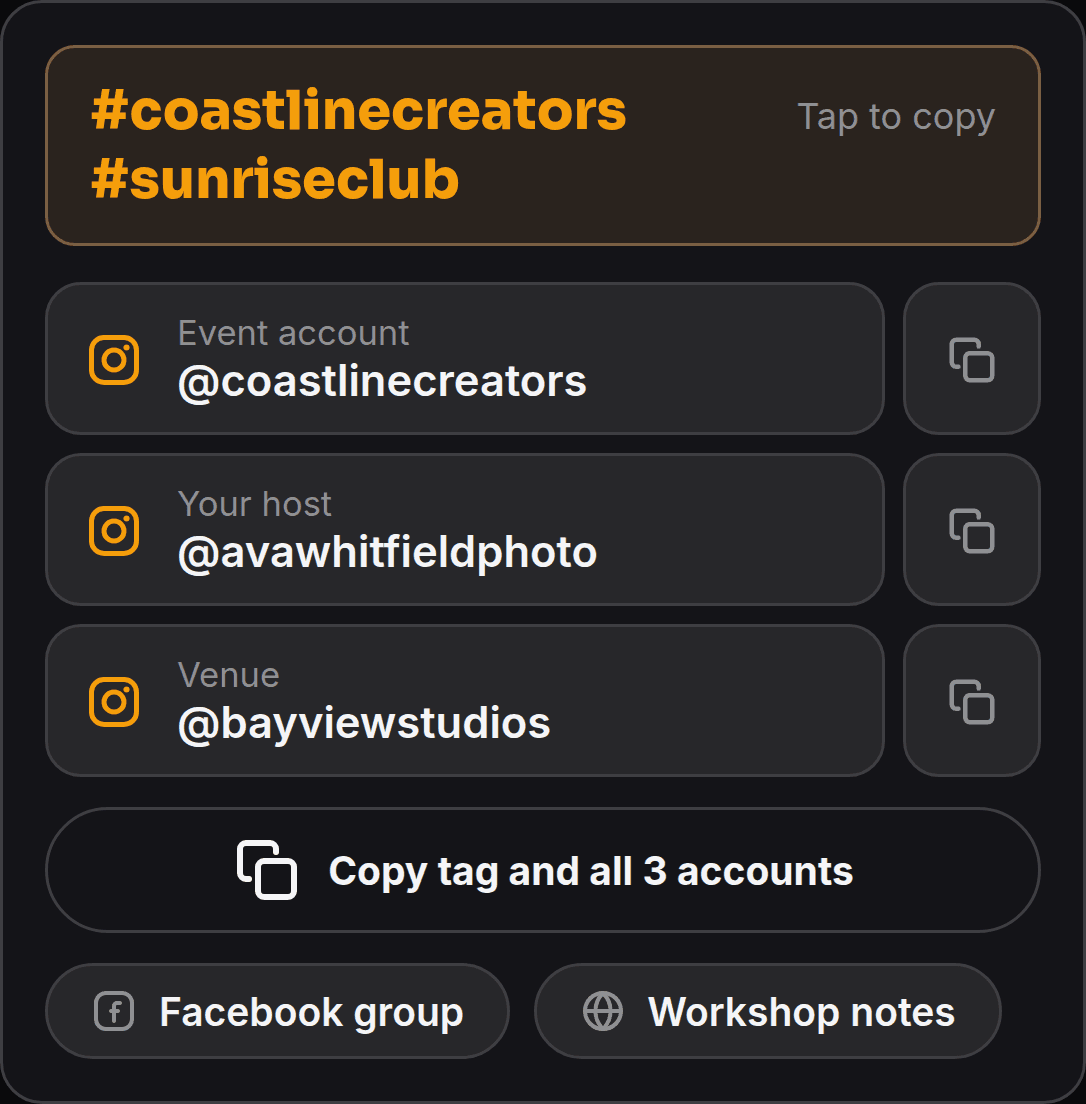
Tag the right accounts, first time
Handles are worked out from the links you already added. Copy one, or copy the hashtag and every account in a single tap, ready to paste into a caption.
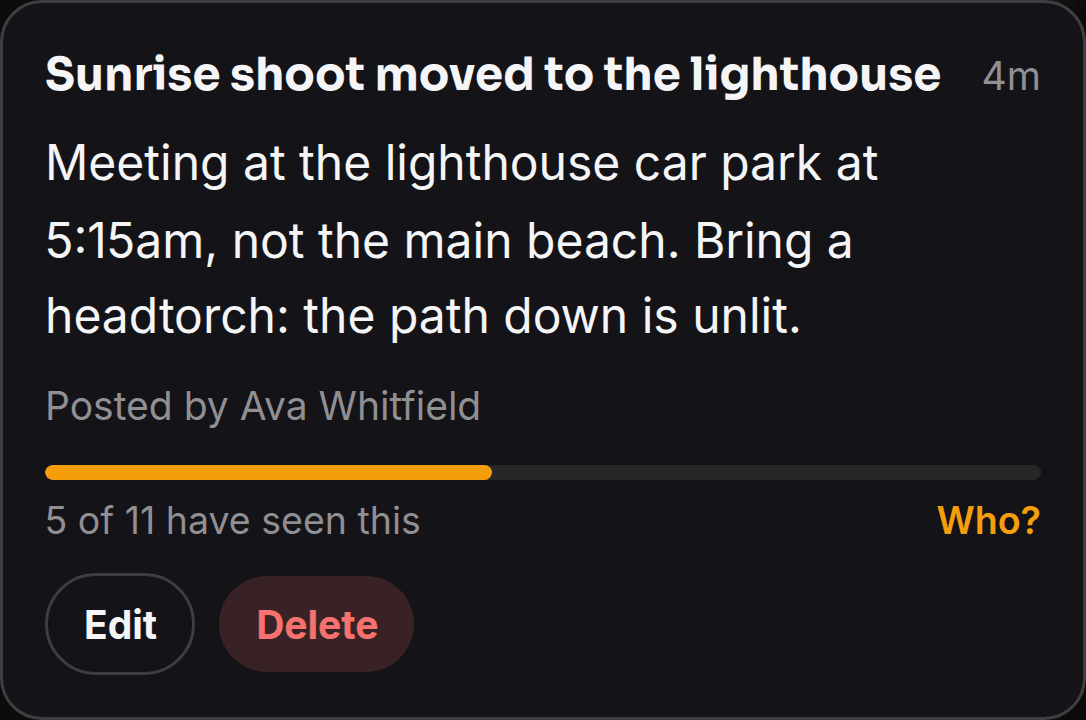
Know it landed
Switch on read receipts and every notice tells you how many have seen it. Tap for the names, the ones who haven't read it first, so you know who to go and find.
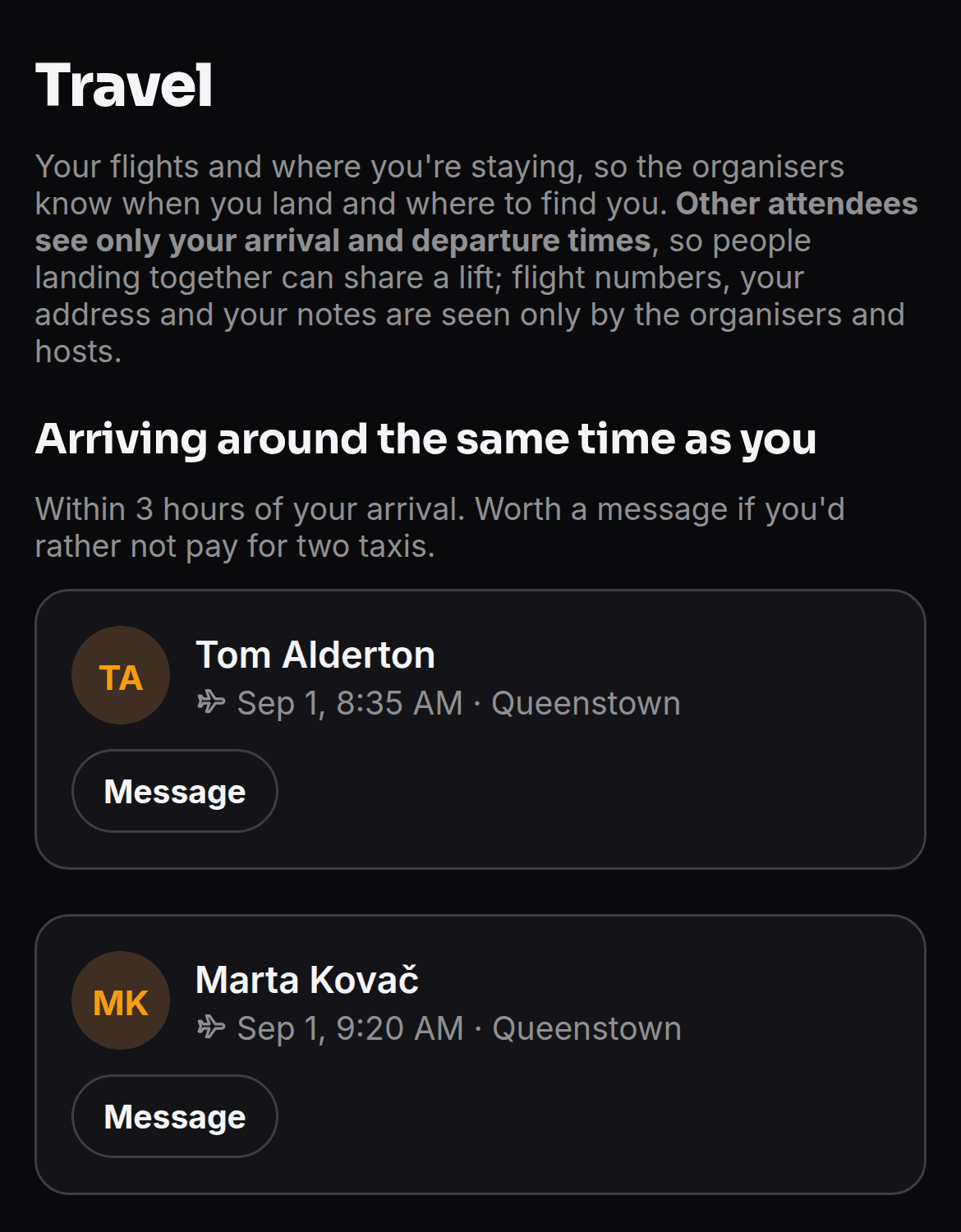
Nobody pays for two taxis
Everyone adds their flights and where they're staying, and the app quietly points out who lands within a few hours of them. You get the whole event's arrivals in time order; attendees only ever see each other's times, never a flight number or an address.
How it works
From first invite to final frame.
Create your event
Build the schedule, add speakers, and import your attendee list; everyone gets an invite to set up.
Open selections
Publish the activities; attendees choose their sessions. Places fill first-come, or you allocate by hand.
Run the day
Check people in by QR, post a notice and see who’s read it, take the coffee order, and watch the gallery fill, all from your phone.
For hosts
Open it from the Hub with the login you already have. Your own schedules, attendees, branding and feature set, on every event you run. EventHost is its own plan, on top of a Hub subscription.
For attendees
A mobile-first app for the people at your event: their personal schedule, the sessions they chose, the group chat and the shared gallery. They join free from an invite link.
One event, every device
On the web, and on iPhone and iPad
You build and run the event in the browser, from the Hub. Your attendees get EventHost from the App Store: their schedule, the sessions they chose, the chat and the gallery, in step with whatever you change. It still runs in any mobile browser, so nobody has to install anything.
Security & privacy
Your attendees' details, looked after.
EventHost holds real personal information: names, contact details, and, where an event needs them, emergency contacts and dietary notes. Protecting it is built into how the app works, not bolted on.
Encrypted in transit and at rest
Everything travels over HTTPS. The most sensitive details, health and dietary notes, emergency contacts, phone numbers and travel, are encrypted in the database, not just stored in it.
Two-factor sign-in for your team
Organisers and admins can add an authenticator app to their account, so a password on its own can't reach the people who can see everyone's details.
Access scoped to your event
Every request is checked on the server against the event it belongs to. One event's data is never reachable from another, and direct messages stay between the two people in them.
You decide how long it's kept
Set a retention window per event. When it passes, everything is permanently deleted, photos included, so a finished event doesn't leave data lying around.
A record of who exported what
Downloading the attendee list is logged: who did it and when. There is always an answer to where a copy of the data went.
Private by design
We collect only what an event needs, never sell attendee data, and share it only with the services that make the app run.
Read the privacy policy, or get in touch for our security and architecture overview if you're running a procurement or security review.
Pricing
Pay for one event, or for the year.
EventHost is priced on its own, separate from the Hub suite, because running a multi-day event is a different job from running a workshop. You need an active Hub subscription underneath it.
AUD. Attendees are free and unlimited on both plans, and the limit is on events, not people. The annual count resets when the plan renews. Buy it from the Hub when your next event lands, not before.
Got an event in the diary?
Set it up in the Hub, import your attendee list, and have the schedule in everyone's pocket before they land.