 Live
OnboardHost
Between the booking and the day there's a waiver to sign, an emergency contact to chase and a balance to collect. OnboardHost sends each client one link that takes care of all three, and payments go straight into your bank account with no fees.
What it does
One link per client
Every client gets their own link by email. It opens on any phone or computer, with no account to make and nothing to install, and it picks up where they left off.
The event, all in one place
Date, start time, meeting point, itinerary, what to bring and a link to the full itinerary, plus a note that their deposit is already paid.
A signed waiver
Clients read your waiver and sign with a finger. Each signed copy keeps the exact wording they agreed to, so changing your waiver later never changes one already signed.
The pre-event form
The gear they're bringing, any dietary or access needs, an emergency contact and their experience level, all in before the day.
Bank transfer, no gateway
Clients pay straight into your account by bank transfer or PayID. No card fees, no payment provider, no merchant account to set up.
Pay in parts
Clients can pay the balance in one go or in instalments up to the due date. Their link keeps working until it's paid.
A reference for every client
Each client gets their own payment reference, like OB12 SMITH, so matching a transfer on your bank statement takes a glance.
You confirm what lands
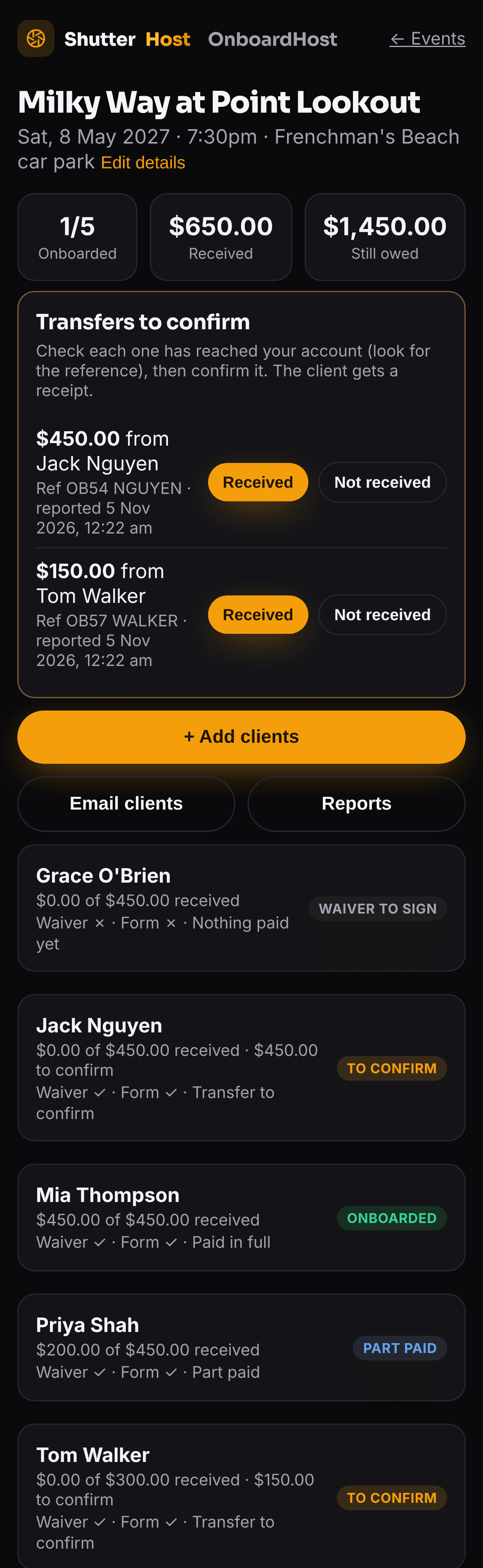
When a client says they've paid, it appears under Transfers to confirm. Tap Received once it's in your account and they get a receipt. Paid in cash? Record it yourself.
No double payments
When a client reports a transfer they see it noted straight away, and the button changes, so nobody reports the same payment twice.
Where everyone's up to
Awaiting payment, part paid, to confirm or onboarded, with a line like Waiver ✓ · Form ✓ under every name, and what's come in and what's still owed.
Emails that send themselves
Invitations, balance reminders, forms reminders, the pre-event info pack and a thank-you, each sent only to the clients it applies to, in your business name.
On to EventHost
Running the trip in EventHost? Add its event code and, once a client has paid, their link shows how to get the app with a button that joins with the code filled in.
Reports for your books
A PDF or CSV of each event, with an optional day sheet of emergency contacts, and a payments report across every event for the financial year.
Straight into CalcHost
Import the payments you've confirmed into CalcHost's Payments tab, and refresh as more come in, so your profit figures use real money received.
Private by design
A link shows only that client's own booking. It stops working 30 days after the event, and the event, waivers and forms are deleted 12 months after it.
A look inside
What your clients see, and what you see.
Real screens from a demo event, on a phone.
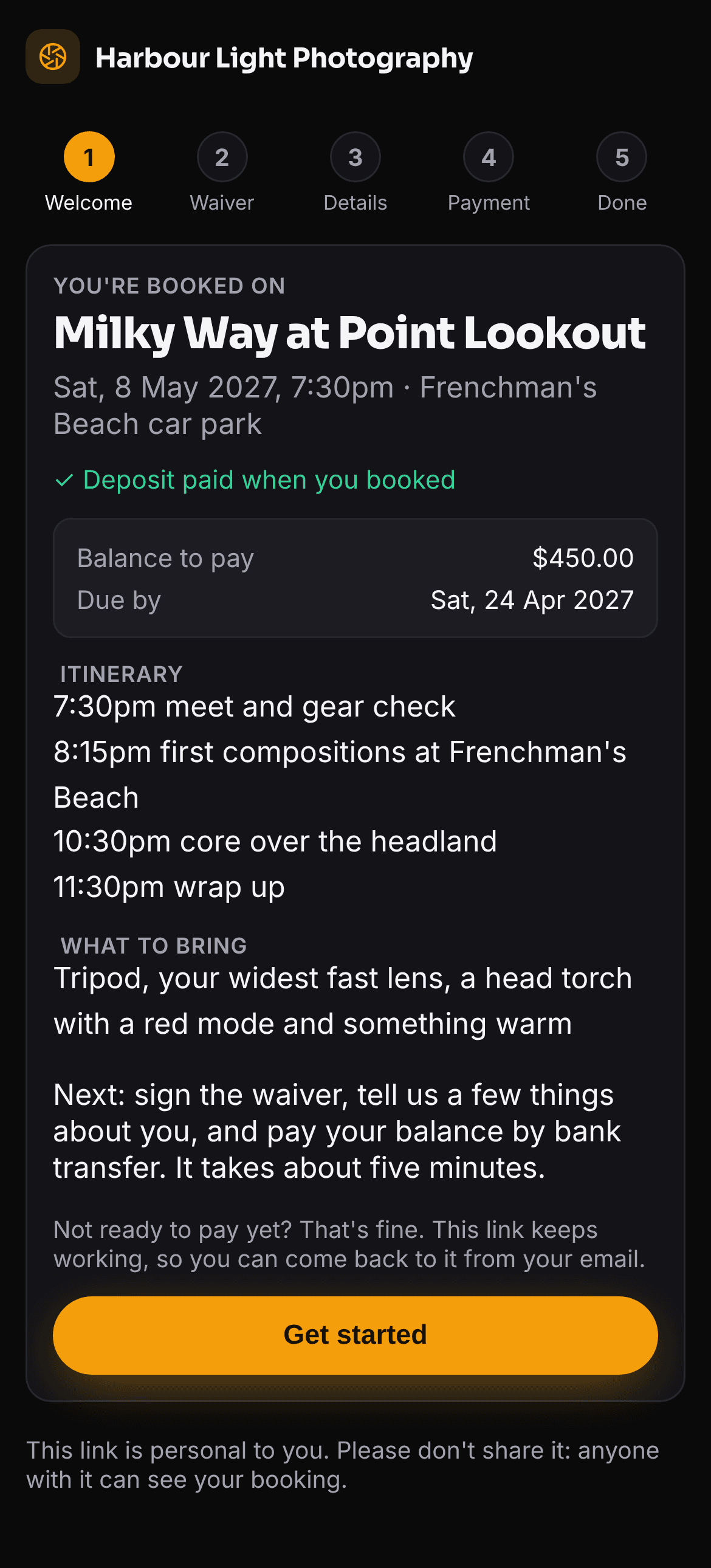
Everything about the day, first
Your client's link opens on the event: when and where, the itinerary, what to bring and what's left to pay. One tap and they're on to the waiver.
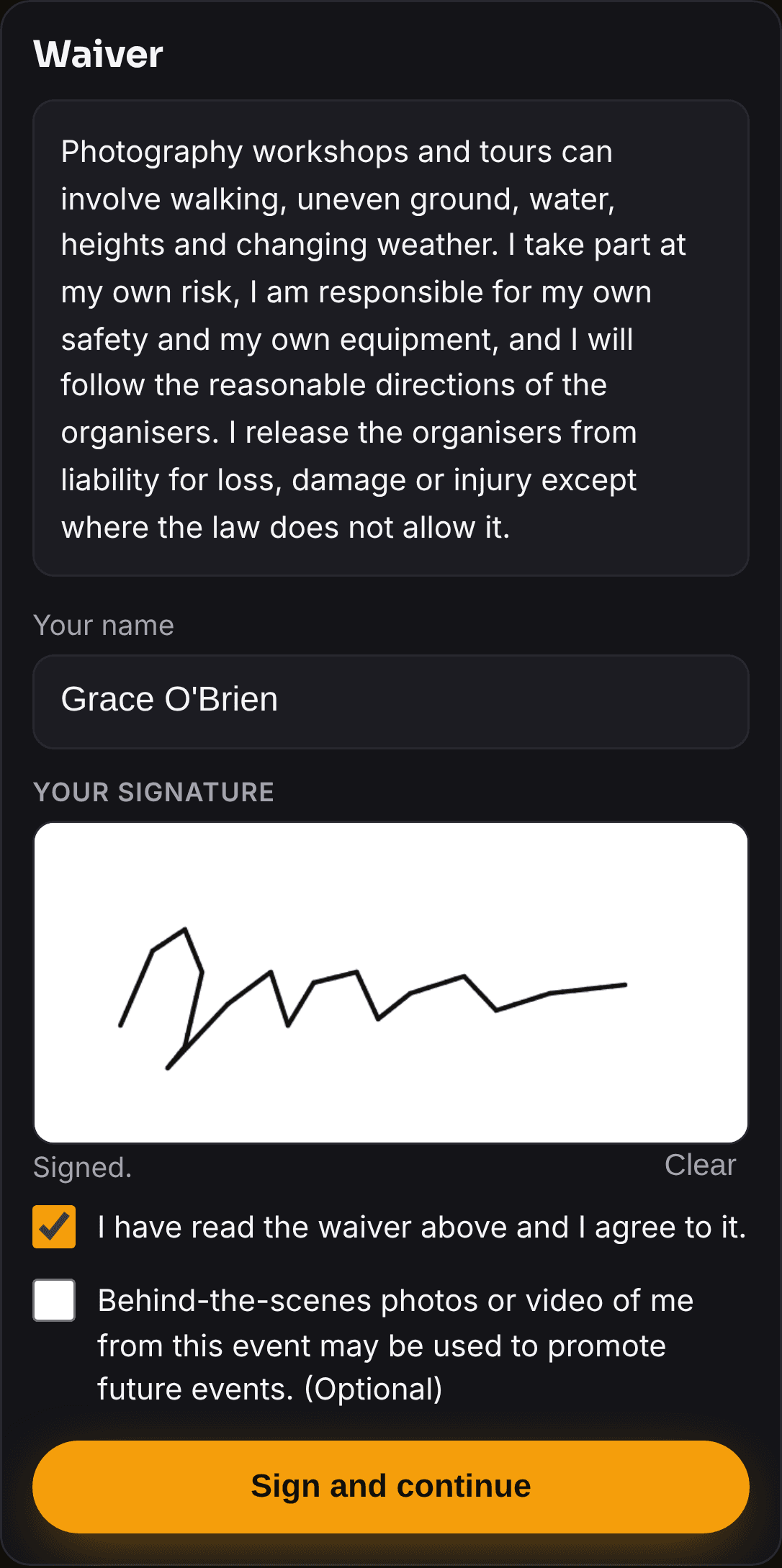
Signed with a finger
They read your waiver, sign in the box and tick to agree, with a separate, optional consent for behind-the-scenes photos.
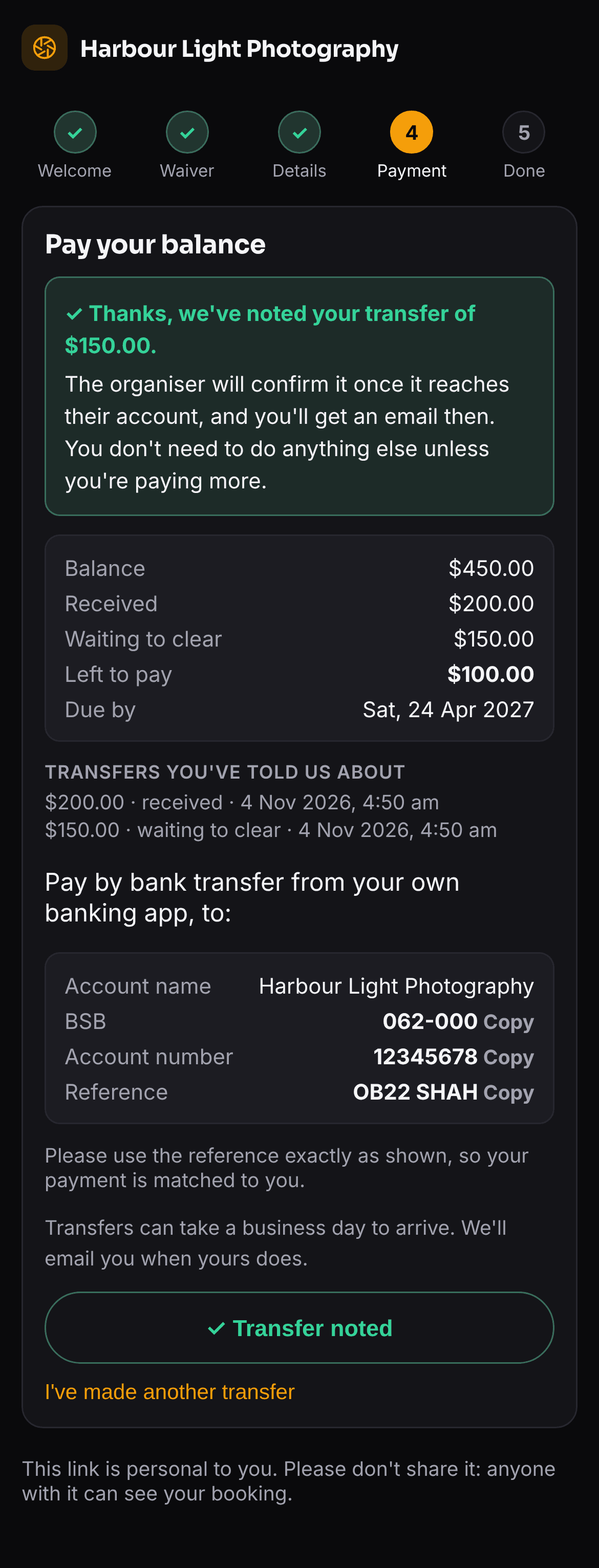
Paying, made clear
Your bank details and their own reference, each one tap to copy. When they tell you they've paid, they see it noted straight away, so nobody reports the same transfer twice.
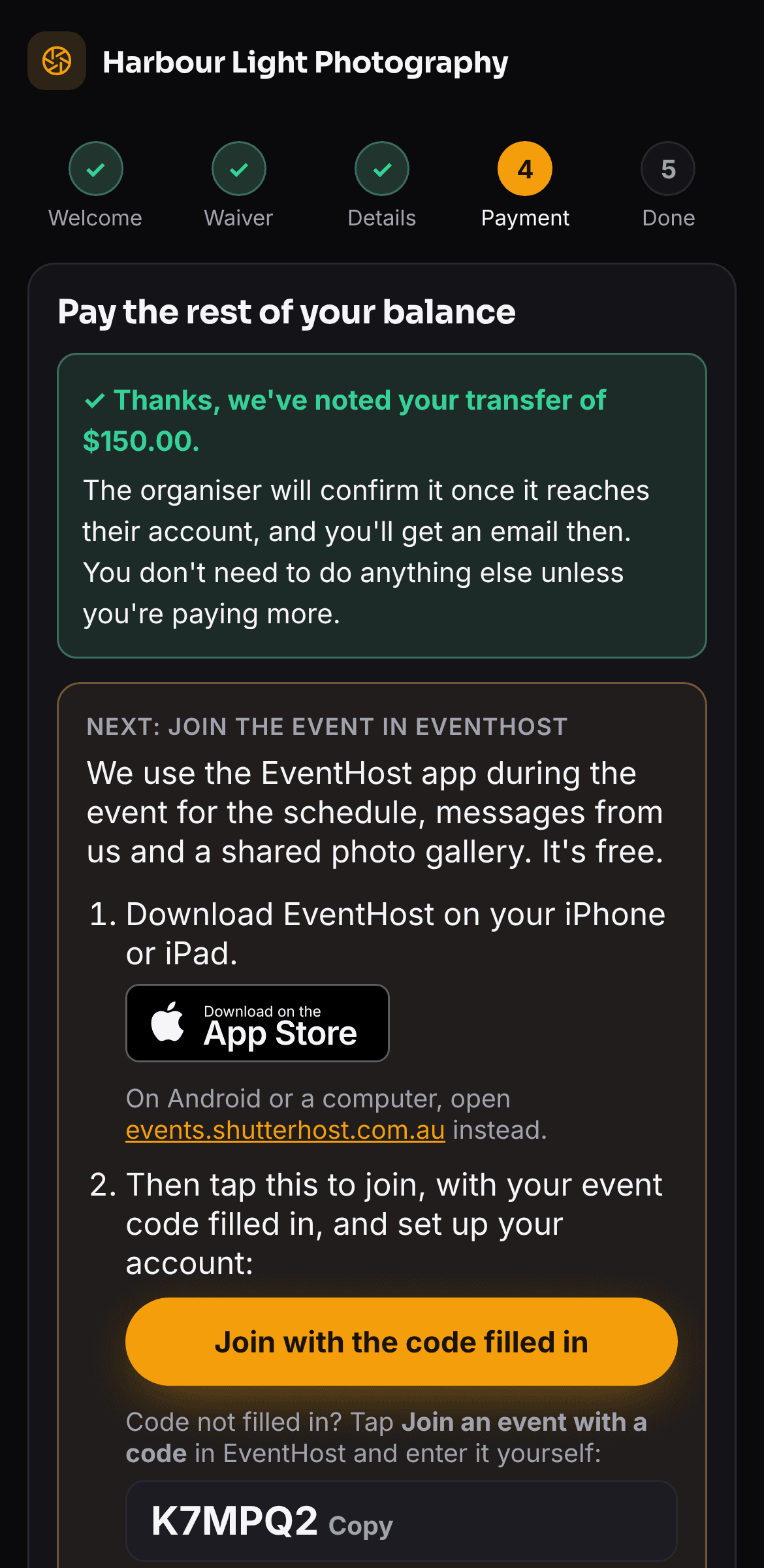
Then on to EventHost
If you run the trip in EventHost, a client who has paid sees how to get the app, with a button that opens it with their event code already filled in.
Your side of it
Transfers waiting for you to confirm sit at the top, then every client with where they're up to: what's done, what they've paid and what's still owed. Reports and email are a tap away.
How it works
From booking to ready in three steps
- 01
Add the event and your clients
Enter the date, meeting point and balance, then paste in your clients' names and emails. Each one gets their invitation straight away.
- 02
They onboard themselves
Clients read the details, sign the waiver, fill in the pre-event form and pay by bank transfer, whenever suits them before the due date.
- 03
You confirm and you're done
Tick off each transfer as it lands, send a reminder to anyone still owing, and send the info pack before the day.
Prefer it on your own WordPress site, with card payments too? The Onboarding & Payments plugin is in the same subscription.
Get OnboardHost
It's included with your Hub subscription at no extra cost, alongside every other tool. Open it from the Hub on any device.